DevOps Excellence
Implementing CI/CD in AWS: A Complete Guide for Modern DevOps
Modern businesses demand software that is faster, more reliable, and scalable. Continuous Integration and Continuous Deployment (CI/CD) have become the backbone of high-performing engineering teams — enabling rapid feature delivery with minimal risk. When combined with the power of Amazon Web Services (AWS), CI/CD transforms into a fully automated, secure, and enterprise-grade pipeline that significantly improves both technical performance and business outcomes.
Why CI/CD Matters for Modern Businesses
Today’s applications are updated frequently — sometimes several times a day. Without automation, businesses face deployment delays, costly manual errors, increased downtime, slower time-to-market, and reduced customer satisfaction. CI/CD solves this by automating testing, building, and deployment, ensuring every release is consistent and reliable.
Why AWS CI/CD Outperforms Traditional Systems
Traditional CI/CD systems rely on self-hosted tools like Jenkins, Bamboo, or on-prem build servers. These require maintenance, scaling, upgrades, patching, and frequent troubleshooting. AWS eliminates these challenges through fully managed, secure, and scalable CI/CD services.
Key Advantages:
- Serverless & Fully Managed: No servers to patch or maintain.
- Elastic Scalability: Build thousands of parallel jobs effortlessly.
- Pay-As-You-Go: Only pay for actual pipeline usage.
- Enterprise-Grade Security: IAM, KMS, Secrets Manager, VPC integration.
- Native Integration: Works seamlessly with EC2, ECS, EKS, Lambda, and more.
Business Impact:
- Up to 60% faster release cycles.
- Reduced deployment failures by 40%+.
- Improved customer satisfaction and faster innovation.
Core AWS Services for CI/CD
CodeCommit
Secure, scalable Git repository service.
CodeBuild
Serverless build service for compiling and testing.
CodeDeploy
Automated deployments to EC2, ECS, or Lambda.
CodePipeline
Orchestrates the entire CI/CD lifecycle.
Typical CI/CD Flow & Architecture
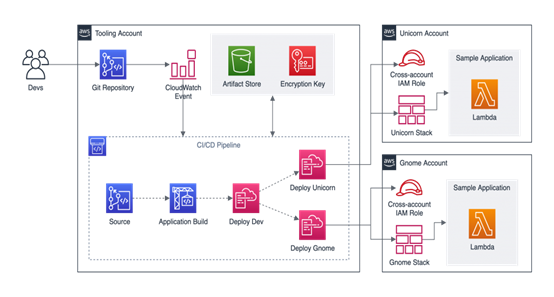
Diagram 1: Standard multi-account CI/CD workflow across tooling and application environments
A modern AWS CI/CD pipeline includes stages for source, build, test, approval, deploy, and monitoring. This structured flow ensures high reliability and safe deployments.
End-to-End CI/CD Architecture on AWS
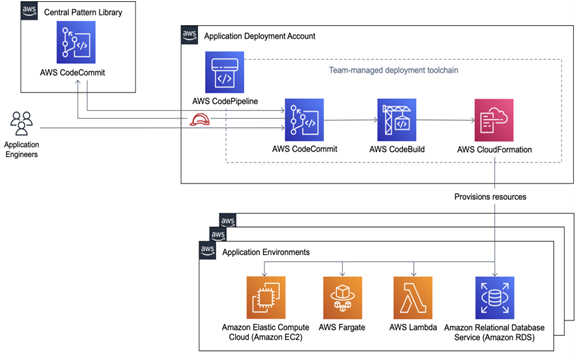
Diagram 2: Technical architecture showing provisioning via CloudFormation and various application environments
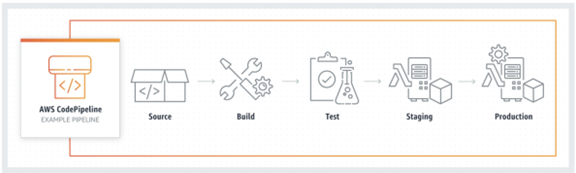
Diagram 3: Visual representation of CodePipeline stages from Source to Production
Step-by-Step Implementation
Step 1: Set Up Source Control
Use AWS CodeCommit or GitHub to store your source code.
Step 2: Create a buildspec.yml for CodeBuild
version: 0.2
phases:
  install:
    runtime-versions:
      nodejs: latest
  build:
    commands:
      - npm install
      - npm run build
artifacts:
  files:
    - '**/*'
Step 3: Configure Code Build Project
Define environment settings, permissions, and integration with your repo.
Step 4: Create S3 Bucket for Artifacts
Artifacts generated by CodeBuild are stored in Amazon S3 for deployment stages.
Step 5: Configure CodeDeploy (Sample appspec.yml)
version: 0.0
os: linux
files:
  - source: /
    destination: /var/www/myapp
hooks:
  AfterInstall:
    - location: scripts/restart_server.sh
      runas: root
Step 6: Build Pipeline in CodePipeline
Define Source → Build → Test → Deploy stages. Add optional quality gates, approval workflows, and automated security scanners.
Modern Containerized Applications
AWS supports CI/CD for containers using ECS Fargate (Serverless Container platform) and EKS Kubernetes (Large-scale microservices deployments with GitOps).
Best Practices for Production-Grade AWS CI/CD
- Use Infrastructure as Code (Terraform/CloudFormation).
- Implement multi-environment pipelines (Dev → QA → Staging → Prod).
- Enable automated rollbacks with CloudWatch alarms.
- Integrate security at every stage (SAST/DAST/container scanning).
- Use blue/green or canary deployments.
- Monitor everything with CloudWatch and X-Ray.
Conclusion
CI/CD on AWS empowers organizations to deliver applications faster, safer, and at scale. With serverless DevOps tools like CodePipeline, CodeBuild, and CodeDeploy, teams can eliminate manual work, reduce deployment failures, and achieve enterprise-grade automation. AWS represents the future of modern DevOps and scalable software delivery.